Built by an advisor, for independent advisory firms.

The blueprint your practice runs on.

Your CRM, scheduling, phones, forms and spreadsheets each do a job. None of them talk to each other, so your team becomes the glue. AdvisorBlueprint connects them into one operating layer on top of your CRM (Redtail today), so client work lands in the right place and you can see the whole practice in one view. Private AI is built in, and it is rolling out to pilot firms.

Manage with the data you already have. Run a smarter business.

  • Automate. Forms, bookings and calls write into your CRM so nobody rekeys.
  • Grow. Households, pipeline and a practice valuation estimate in one place.
  • Scale. Capacity and hiring cues show when the book needs another seat.

Automate · Grow · Scale

Now accepting a limited group of pilot firms.

Demo data
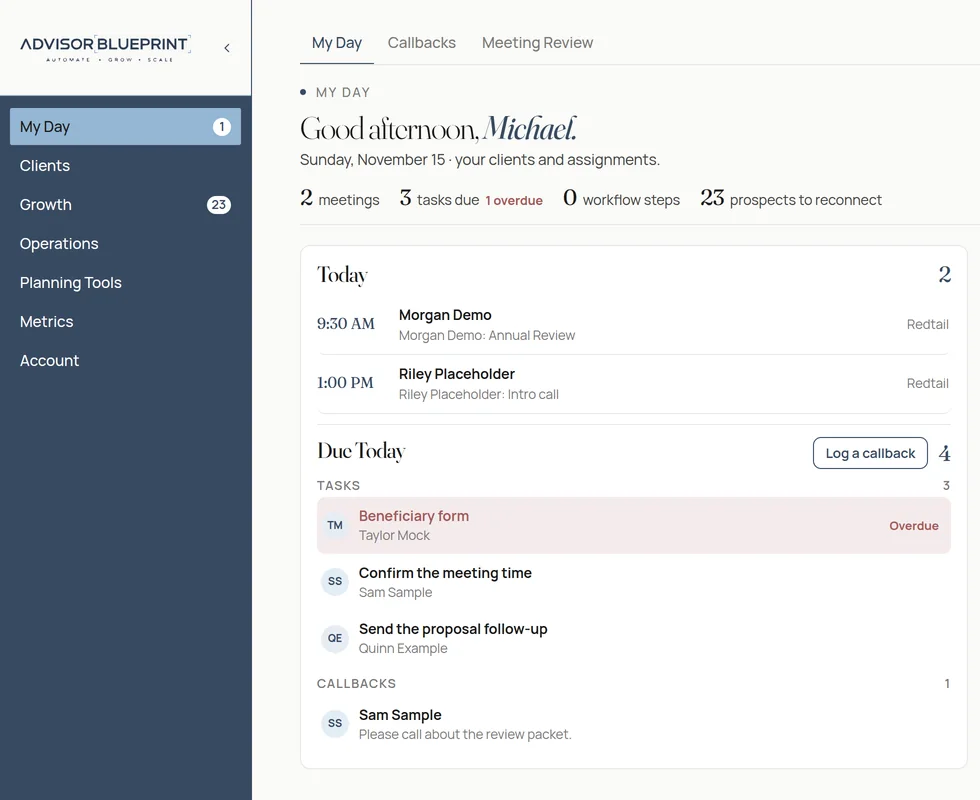
My Day for Michael, using fictional demo data
My Day for Michael. Fictional demo data.
Built by an advisor Redtail today, more CRMs coming Branded to your firm
Why

Why firms choose AdvisorBlueprint.

Automation that builds capacity, a better client experience, and a clear view of what each relationship actually costs to serve.

12 hrs

saved every week Based on our pilot firm's experience. Results vary.

Automation that builds capacity

Busywork shouldn't set how many clients a firm can serve well. AdvisorBlueprint automates scheduling, follow-through and CRM updates so advisors spend more time with clients and less time catching up after the meeting.

Onboard clients in less time

Cut the admin of setting up a new client. Intake forms, document reading and guided workflows move data into the right place, so onboarding is faster for the client and lighter for the team.

An experience clients can feel

Reviews happen on time, meetings start prepared, and follow-ups go out while the conversation is still fresh.

AI notetaking and CRM updates, with your approval

Record or upload a meeting and get a summary, tasks and CRM updates drafted in your firm's own private AI environment. Nothing is written to the CRM until an advisor approves it.

One operating layer, private by design

Sits on top of your CRM and the rest of your stack, with client data staying in the firm's own environment and never used to train outside models.

The pain

Your tools don't talk to each other.

Five logins. One client. The record never catches up on its own.

CRMthe client record
Schedulinganother login
Phonesanother login
Formsanother login
Spreadsheetsanother file

The cost is the team. Someone rekeys the booking, the form, and the call, then runs the practice from another spreadsheet. Another tool beside that stack leaves the same gap.

The bridge

One operating layer on top of your CRM.

Manage with the data you already have. Run a smarter business.

AdvisorBlueprint sits on the CRM you already use and connects scheduling, phones, forms, and the books to that client record. It is an operating layer on top of your CRM (Redtail today), with more CRMs coming. Client work lands in the right place, and the practice is visible in one view.

Scheduling, phones, forms, and the bookseach still does its job
AdvisorBlueprintone operating layer on top of your CRM
Redtail todaymore CRMs coming
Automate

The handoffs write themselves.

Forms, bookings, and calls land on the Redtail contact, so nobody rekeys them.

Demo data
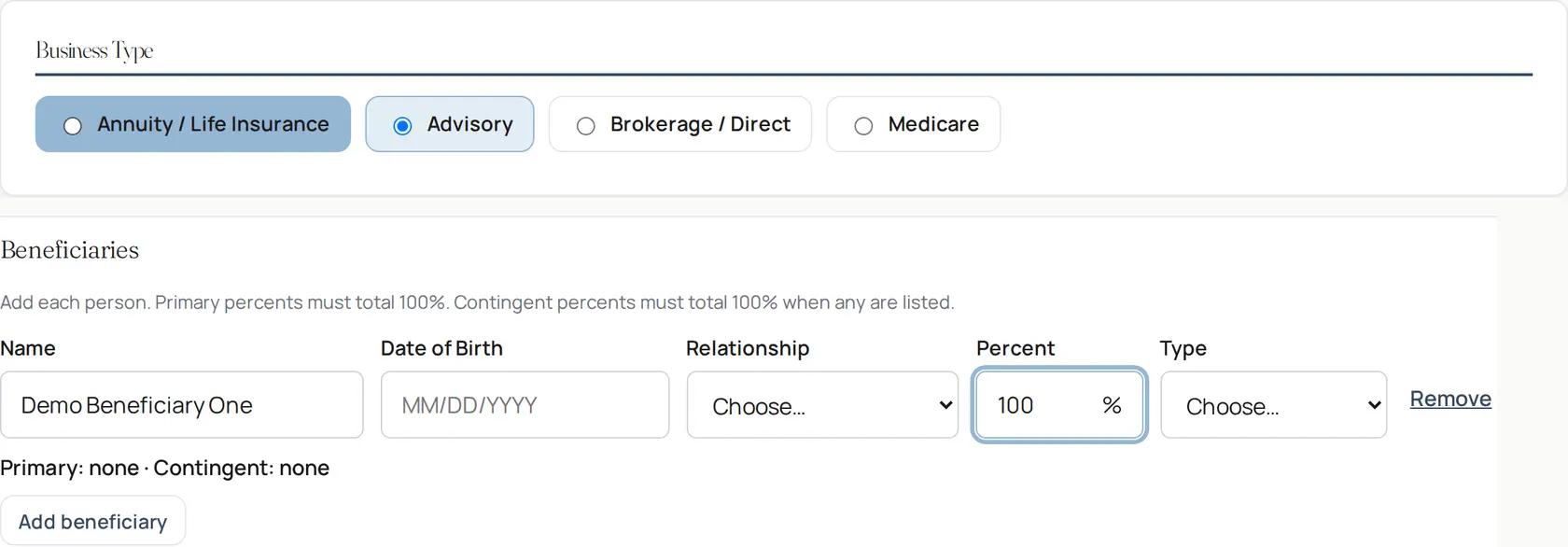
New account intake, using fictional demo data
New account intake. Fictional demo data.

Calendly to Redtail

Bookings, reschedules, and cancellations are written to the client.

Intake to a Redtail workflow

New Account and Money Movement intake can start the onboarding workflow when a prospect becomes a client.

Form invites

Check-In, Client Interest, and Onboarding are secure links the firm sends today.

Coming soon Emailing the invite from AdvisorBlueprint

Callbacks

Calls and voicemails can be matched to the client and kept on the day's list.

Grow

The whole practice, in one view.

Manage with the data you already have. Run a smarter business.

Households, pipeline, a quarterly scorecard, and a practice valuation estimate, kept current from the data you already keep.

Demo data
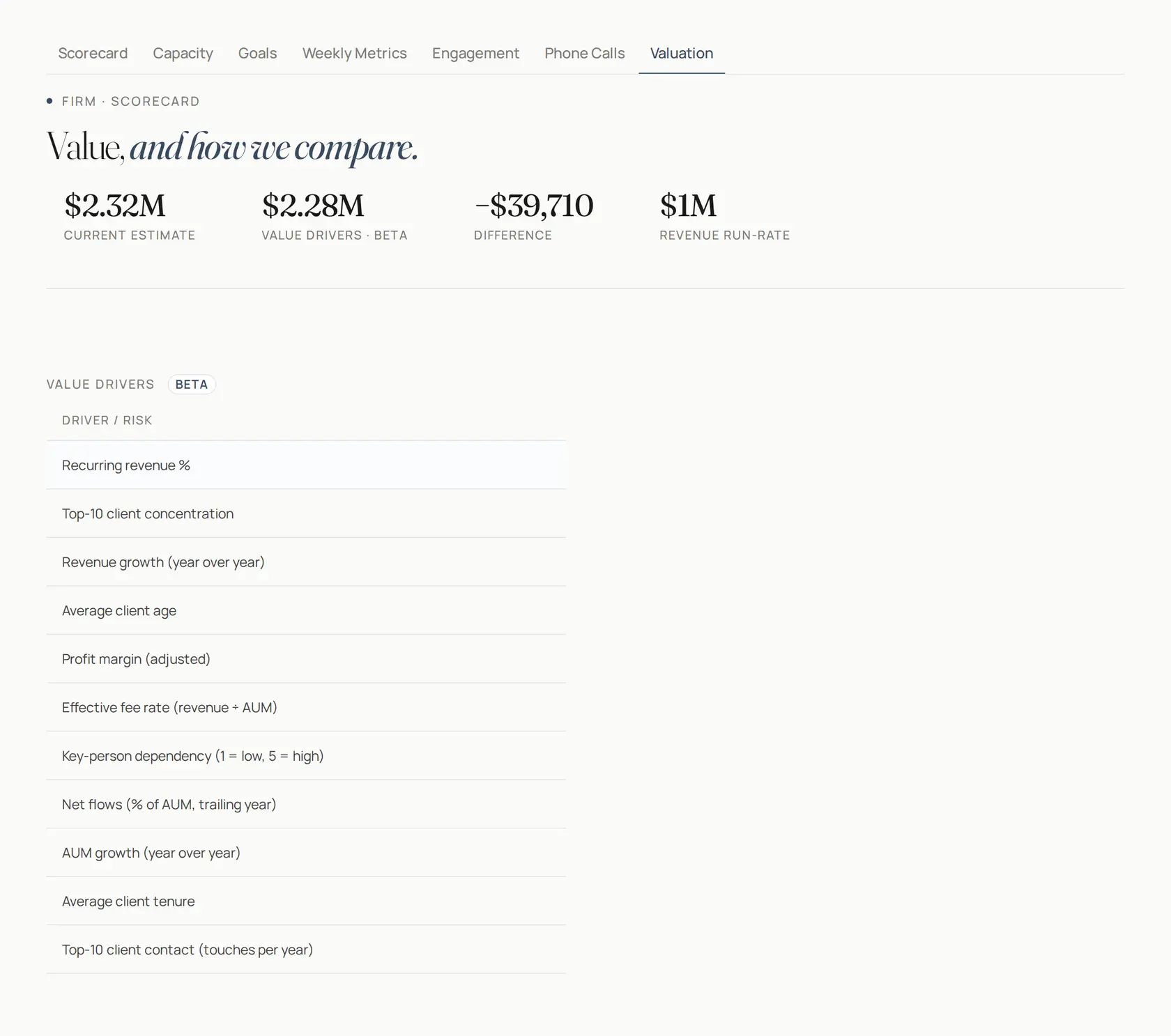
Practice valuation estimate and value drivers, using fictional demo data
Practice valuation estimate and value drivers. Fictional demo data.

Segmentation

Households are scored from Redtail data. A tier change is written back only after someone confirms that household. The weekly digest stays off until the firm turns it on.

Scorecard and goals

A quarterly scorecard and goals, from closed assets and from QuickBooks when it is connected. Built to fit how EOS® firms already run: rocks, goal tracking and a quarterly scorecard.

Practice valuation estimate

An estimate of what the practice is worth, with the value drivers behind it. It is an estimate for the firm.

AUM from the feed

Firm AUM comes from the Redtail account feed: Albridge-fed accounts plus accounts entered by hand, with an as-of date from the last sync. The figure is kept current from that feed.

EOS® is a registered trademark of EOS Worldwide, LLC. AdvisorBlueprint is not affiliated with or endorsed by EOS Worldwide.

Scale

The right people, the right book.

Access follows a preset or a custom grant. Capacity and a hiring cue show when the book needs another seat.

Demo data
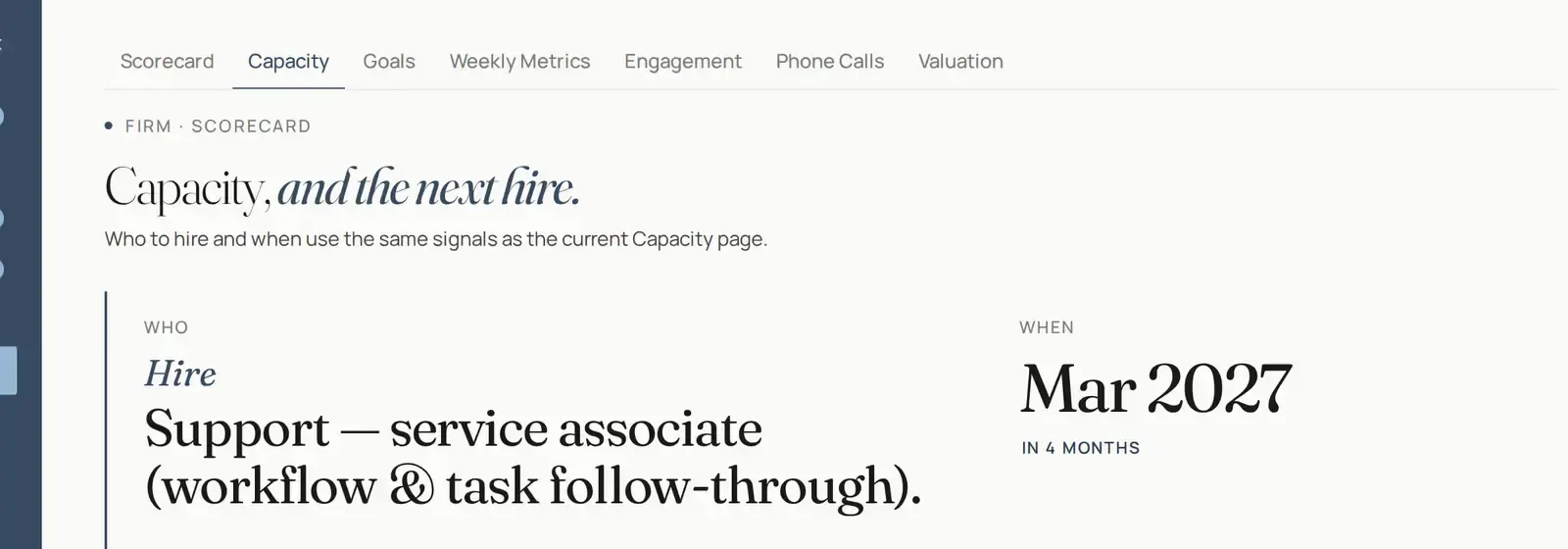
Capacity and hiring cue, using fictional demo data
Capacity and hiring cue. Fictional demo data.

Role presets

CEO, Admin, Operations, and Advisor, plus a custom grant for one person.

Own-book scoping

Firm-wide client access sees any client. The Advisor own-book preset follows Redtail permission groups.

Capacity and a hiring cue

See when advisors or support are nearing capacity, and whether the next hire is an advisor or support, so service keeps pace as you grow.

Private AI

Private AI that works inside your firm.

Built in, and rolling out to pilot firms. Client data stays in the firm's private, walled-off environment and is never used to train outside models. A write back to the CRM happens only after an advisor approves it.

AI notetaking and CRM updates

Record a meeting or upload one. You get a summary and tasks to approve into your CRM. Call consent is built in.

Ask the portal

Plain-English answers from your client data and documents. For example: who's missing a driver's license on file?

Document reading

Prefill forms from statements and estate documents. You review every field before it is saved.

Meeting prep and follow-up drafts

A meeting prep brief and a follow-up email, kept as drafts. Nothing is sent for you.

Workflow assistant

Suggests the right CRM workflow from the context, and launches it only after you approve.

Custom plan reports

Branded client reports, with calculations such as Monte Carlo done in-house.

Apply to be a pilot firm
Client experience

A curated path, from first meeting to every review.

Check-In, Client Interest, and Onboarding are secure links the firm sends. The client fills in the form. The answers land with the team. This is the firm's own workflow, not a separate place the client has to learn.

  • Coming soon Welcome invites emailed from AdvisorBlueprint
  • Coming soon Client document upload
Demo data
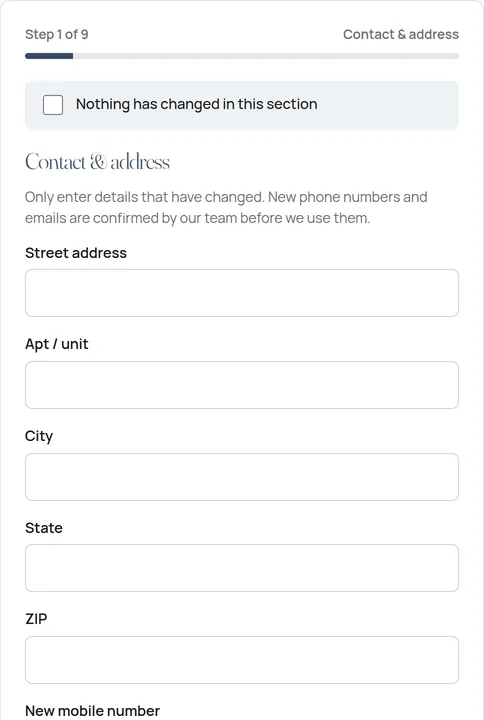
Sample check-in form. Empty fields, no client data.
Check-in form, sample only. No client data.

Check-In

A secure link before a review. The client marks what changed. The team confirms new phone numbers and emails before they are used.

Client Interest

A secure link for what the client wants to cover, so the meeting starts from their list.

Onboarding

A secure link for new-account details, from business type to beneficiaries. E-sign is available when the firm connects DocuSign.

Built by an advisor, not a software company.

I've been in financial services since the early 2000s. I built AdvisorBlueprint inside my own practice because I was tired of juggling ten open windows and paying for a stack of tools that didn't talk to each other, while my team rekeyed the same data three times. I wanted one place where everything was clearly laid out: who needed attention, when to hire, and an estimate of what the practice was worth. And because so many of us run our firms on EOS, AdvisorBlueprint is designed to fit how EOS® firms already run: rocks, goal tracking and a quarterly scorecard. We didn't find a product that did all that, so we built it. Every feature here was tested on real days in a real practice before it went anywhere else.

Built for regulated practices

Designed with compliance in mind.

AdvisorBlueprint was built inside a working advisory practice, with supervision and recordkeeping in view from the start.

R

Your CRM stays the system of record

Client records, opportunities, and workflows stay in your CRM. AdvisorBlueprint is the operating layer on top.

D

Client data stays in the firm

Client data stays in the firm's private, walled-off environment and is never used to train outside models.

E

Estimators, not advice

Planning tools produce estimates and illustrations for professional use. Your judgment and your firm's review process stay in charge.

A

Access by preset and grant

CEO, Admin, Operations, and Advisor presets, plus custom grants. Firm-wide client access sees any client. The Advisor own-book preset follows Redtail permission groups.

How it works

From sign-up to your first blueprinted day.

Pilot firms get hands-on help at every step.

Connect Redtail

Link Redtail. From then on, updates are written to it and the record is kept current. More CRMs are coming.

Brand your workspace

Add your firm's name, logo, and colors in branding settings.

Walk through setup

The onboarding walkthrough sets up your team, service tiers, pipeline, and intake forms.

Run your day

Open My Day and work from one view, with the CRM kept current as bookings, forms, and calls land.

Pilot program

Help shape the blueprint.

We're inviting a small group of independent advisory firms to use AdvisorBlueprint in their practice and help shape what we build next.

FreeThe pilot is free for participating firms.

Early access to every workspace

My Day, Growth, Clients, Operations, Planning Tools, and Metrics.

Hands-on onboarding

We'll help connect Redtail, brand your workspace, and set up your workflows.

A direct line to the team

Your feedback goes straight to the people building the product.

What we ask

Use it in your day-to-day work and join regular feedback conversations.

Apply to be a pilot firm

Free for participating firms · About 2 minutes

  1. 1Firm
  2. 2Contact
  3. 3Goals
  4. 4Review
Tell us about your firm
Please enter your firm's name.
Your role
Please choose your role.
Please choose one.
Please choose one.
Which CRM do you use?
Please choose one.
How can we reach you?
Please enter your name.
Please enter a valid email address.
Please enter a valid phone number, or leave it blank.
What would you like help with?

Choose all that apply.

Please choose at least one.
Review your application
Please confirm to submit.
FAQ

Questions, answered.

What is AdvisorBlueprint?

AdvisorBlueprint is the operating layer on top of your CRM (Redtail today). It connects scheduling, phones, forms, and the books so client work lands in the right place and you can see the whole practice in one view. More CRMs are coming.

Isn't this just another tool?

It is an operating layer on the CRM you already use, not another tool sitting beside it. Bookings, forms, and calls land in that record.

Does it replace our CRM?

No. Your CRM stays the system of record. AdvisorBlueprint writes to its opportunities, households, and workflows and gives the team one view of that data.

Do we have to export or re-enter data into our CRM?

No. Client and form data is written to Redtail, so the team is not pushing, exporting, or rekeying it.

Is client data used to train an outside model?

No. Client data stays in the firm's private, walled-off environment and is never used to train outside models. A write back to the CRM happens only after an advisor approves it.

Which CRMs does it work with?

Redtail today, with more CRMs coming. If you use a different CRM, apply anyway and tell us which one. It helps us plan what comes next.

Does AdvisorBlueprint give investment or tax advice?

No. The planning tools, including the Roth conversion estimator, tax estimator, and estate summary, produce estimates and illustrations for use by financial professionals. They are not recommendations and do not replace professional judgment or your firm's review.

What does the pilot involve?

The pilot is free for participating firms. Pilot firms get early access, hands-on onboarding, and a direct line to the team. In return, we ask you to use AdvisorBlueprint in your practice and share regular feedback.

How much does it cost?

The pilot is free for participating firms. Pricing for general availability has not been announced.

Can we put our own branding on it?

Yes. Firm branding settings let you add your firm's name, logo, and colors, including on printable estate summary reports.

I'm already a user. Where do I sign in?

Sign in at app.advisorblueprint.ai.

You don't need another disconnected tool. You need a blueprint.

Connect the tools you already use. See the practice in one view. Join the pilot and help shape what comes next.